Posting rich tables in your Slack messages (without code blocks)

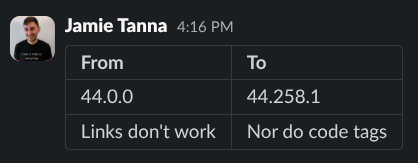
A screenshot of a message from Jamie in Slack. It shows a nicely formatted table in Slack's native table rendering, and shows each column wide enough for the text inside it. The table headings are in bold, and none of the other text is formatted

In a follow-up to my post last week about syntax highlighting in Slack, it also turns out that Slack also supports a similar writing flow that allows you to insert rich-text tables into your messages, as long as you author them as Markdown externally!

For instance, to get output like:

A screenshot of a message from Jamie in Slack. It shows a nicely formatted table in Slack's native table rendering, and shows each column wide enough for the text inside it. The table headings are in bold, and none of the other text is formatted

We would need to write:

| From | To |
| -- | -- |
| [44.0.0](https://github.com/renovatebot/renovate/releases/tag/44.0.0) | [44.258.1](https://github.com/renovatebot/renovate/releases/tag/44.258.1) |
| Links don't work | Nor do `code tags` |

And copy-paste that syntax into Slack.

(But note that it doesn't appear to allow any Markdown rendering for each table cell)

As with the syntax highlighting, it's important o remember that this requires you to paste this Markdown into the editor, you can't write the plain table as-is.

Written by Jamie Tanna's profile image Jamie Tanna on .

Content for this article is shared under the terms of the Creative Commons Attribution Non Commercial Share Alike 4.0 International, and code is shared under the Apache License 2.0.

This blog post is 100% human-written, and has nothing derived from LLMs (be it code, editorial support or prose).

This post was filed under articles.

Interactions with this post

Interactions with this post

Below you can find the interactions that this page has had using WebMention.

Have you written a response to this post? Let me know the URL:

Do you not have a website set up with WebMention capabilities? You can use Comment Parade.