Making an optional, required, status check with GitHub Actions

Something that I've hit time and time again over the years - but seemingly have never blogument'd - is that when you add a required status check on GitHub (in branch protection or a Ruleset), it needs to report back as successful before you can merge a given Pull Request.
This is absolutely reasonable, and I don't think there are many complaints folks would have about this requirement. That is, until you want to consider how to handle checks that you don't necessarily want to run all the time.
For instance, let's say you have a smallish monorepo where there is a mix of Java, backend Typescript and frontend React + Typescript. If you're only changing one of those parts of the codebase - or if you're fixing a typo in a Markdown file - you probably don't want to run all three suites of tests.
There may be cases where the frontend needs to re-run its tests if there's a change in the backend code for instance if you've got tests that collaborate on the state of the API contract, but for the most part, the test suites only cover the changes in their part of the codebase.
This results in the following set of status checks being enforced on a given PR:
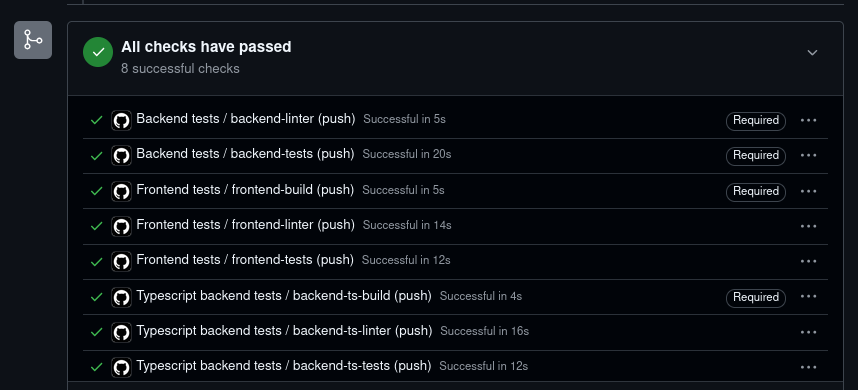
The ideal experience for a contributor to the codebase is that they don't want to run all these unrelated tests when they're modifying a scoped part of the codebase, but this isn't super straightforward with the way the status checks work, because if you do it wrong, you end up with a check that'll never pass:
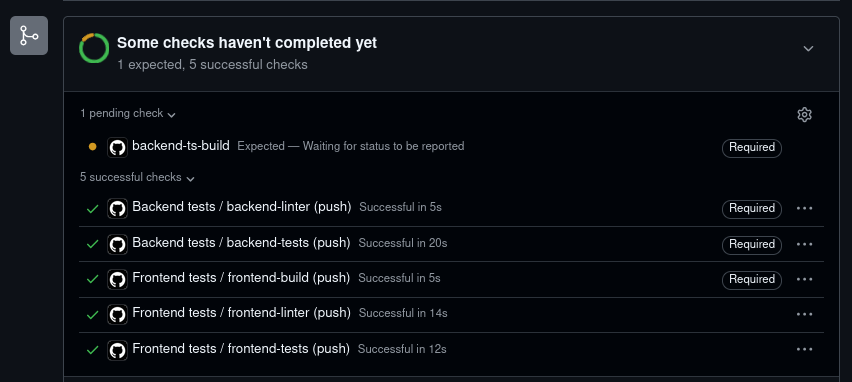
I've tried a few options over the years, and found that my preferred option is:
- Use your primary workflow (i.e.
.github/workflows/bff.yml) - Add a set of steps at the start of the workflow to determine files changed
- If any files you want have changed, then run the workflow
- If not, add a fake step to run as "successful"
For instance, let's say that we have a repository like so:
.
├── backend
│   └── fake.Java
└── ts
    ├── backend
    │   └── server.ts
    └── frontend
        └── Page.ts
.github
└── workflows
    ├── backend.yml
    ├── bff.yml
    └── frontend.yml
And given the following workflow:
name: Typescript backend tests

on:
  push: {}

jobs:
  backend-ts-linter:
    runs-on: ubuntu-latest

    steps:
      - name: Run the linter
        run: |
          # pretend that we're doing work
          sleep 12

  backend-ts-build:
    runs-on: ubuntu-latest
    needs:
      - backend-ts-linter
      - backend-ts-tests

    steps:
      - name: Build app
        run: |
          # pretend that we're doing work
          sleep 2

  backend-ts-tests:
    runs-on: ubuntu-latest

    steps:
      - name: Run the tests
        run: |
          # pretend that we're doing work
          sleep 9
If we wanted to make sure that this only triggers when there are any changes to the ts/backend directory, the best way of doing this is with:
name: Typescript backend tests

on:
  push: {}

jobs:
  changes:
    runs-on: ubuntu-latest
    steps:
      - uses: actions/checkout@v7
        with:
          persist-credentials: false
          # to allow us to check all changes
          fetch-depth: 0

      - name: Determine whether relevant files changed
        run: |
          base="${{ github.event.pull_request.base.sha || github.event.before }}"

          # if it's a new branch / if triggered i.e. through a `workflow_dispatch` (not used in this Workflow)
          if [ -z "$base" ] || [ "$base" = "0000000000000000000000000000000000000000" ]; then
            echo "needed=true" >> "$GITHUB_OUTPUT"
            exit 0
          fi

          changed_files="$(git diff --name-only "$base" "${{ github.sha }}")"
          if echo "$changed_files" | grep -qE '^ts/backend/'; then
            echo "needed=true" >> "$GITHUB_OUTPUT"
          else
            echo "needed=false" >> "$GITHUB_OUTPUT"
          fi

  backend-ts-linter:
    needs: changes
    if: needs.changes.outputs.needed == 'true'
    runs-on: ubuntu-latest

    steps:
      - name: Run the linter
        run: |
          # pretend that we're doing work
          sleep 12

  backend-ts-build:
    runs-on: ubuntu-latest
    needs:
      - backend-ts-linter
      - backend-ts-tests

    steps:
      - name: Build app
        run: |
          # pretend that we're doing work
          sleep 2

  backend-ts-tests:
    needs: changes
    if: needs.changes.outputs.needed == 'true'
    runs-on: ubuntu-latest

    steps:
      - name: Run the tests
        run: |
          # pretend that we're doing work
          sleep 9
With this, if we make a change that only touches backend/fake.Java, we will now correctly skip backend-ts-build:
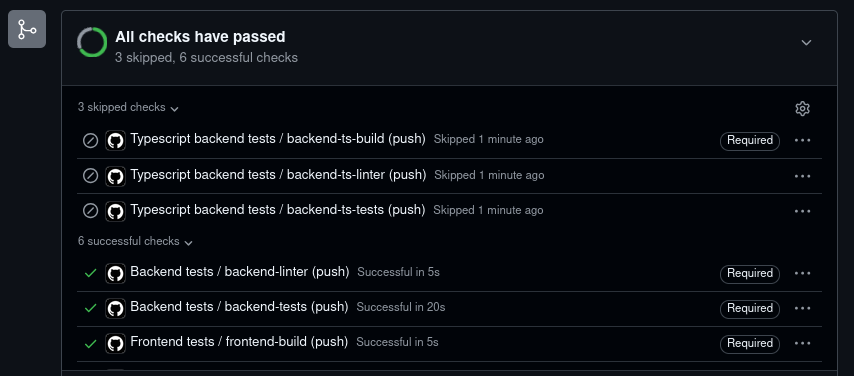
By using the if here, we're able to show the step as having been run, but skipped, which both satisfies branch protection, and is a bit clearer to reviewers to let them know that the check hasn't actually fully run.
Honourable mentions
Creating a "fake" implementation of a step
At Elastic, we had an Organisation Ruleset which was enforced for repositories that used our then-docs platform, which would require a CI check to have run to validate the docs were well-formed.
However, in cases where the docs weren't rebuilt - because they hadn't been touched - this led to Expected — Waiting for status to be reported being reported, which was frustrating, as we didn't want to run an expensive rebuild.
Instead, we went with the approach of creating a "fake" Workflow. Using our example repo structure shown above, this would look like the following workflow:
# NOTE that the `name` needs to be in line with the name of the workflow you're shadowing, otherwise, depending on how your branch protection / Rulesets are set up, this won't match
name: Typescript backend tests

on:
  push:
    paths-ignore:
      - ts/backend/**

jobs:
  backend-ts-build:
    runs-on: ubuntu-latest

    steps:
      # NOTE that the `name` needs to be in line with the name of the step you're shadowing, otherwise, depending on how your branch protection / Rulesets are set up, this won't match
      - name: Build app
        run: |
                    exit 0
This could also be used for the reverse case - for instance where a docs-only update should not trigger a build of your application which is required by your status checks.
I prefer the clarity of the "skipped" check when using the if, but if you're not as bothered by that, using this "fake" Workflow works well too.
Buildkite's monorepo-diff plugin
I did really like working with Buildkite's CI platform, and plugins like the monorepo-diff Buildkite plugin provided a native primitive for this, allowing you to do things like:
---
# SPDX-License-Identifier: Apache-2.0
# Via https://github.com/elastic/workshops__mcp-server-elasticsearch/blob/95c15e8ec5d4cfab1dd0b06a1188919b0ea5c0d7/.buildkite/pipeline.yml#L6
# $yaml-language-server: $schema=https://raw.githubusercontent.com/buildkite/pipeline-schema/main/schema.json
steps:
  - label: "Triggering pipelines"
    plugins:
      monorepo-diff#v1.4.0:
        diff: ".buildkite/diff ${BUILDKITE_COMMIT}"
        wait: true
        watch:
          - path: "renovate.json"
            config:
              label: "Verify Renovate configuration"
              command: "renovate-config-validator"
              agents:
                image: "..."
          - path: "catalog-info.yaml"
            config:
              command: "/agent/check-catalog-info.sh"
              agents:
                image: "..."
          - default:
              config:
                label: ":pipeline: Upload default Pipeline"
                command: "buildkite-agent pipeline upload .buildkite/default-pipeline.yml"
In this case, we could target specific changes based on whether file(s) had changed in a given part of the project, or even uploading a whole other set of pipeline steps.
Do not use Workflow-level paths / paths-ignore
As hinted at above, if you try and use paths / paths-ignore to skip the Workflow - to prevent any CI time being used for the job - you'll end up with a check that can't ever pass.
For instance, the following workflow using paths:
name: Typescript backend tests

on:
  push:
    # NOTE: this is what breaks the check, as the whole Workflow doesn't run
    paths:
      - ts/backend/**

jobs:
  backend-ts-linter:
    runs-on: ubuntu-latest

    steps:
      - name: Run the linter
        run: |
          # pretend that we're doing work
          sleep 12

  backend-ts-build:
    runs-on: ubuntu-latest
    needs:
      - backend-ts-linter
      - backend-ts-tests

    steps:
      - name: Build app
        run: |
          # pretend that we're doing work
          sleep 2

  backend-ts-tests:
    runs-on: ubuntu-latest

    steps:
      - name: Run the tests
        run: |
          # pretend that we're doing work
          sleep 9
Will lead to the following Expected — Waiting for status to be reported:
CodeCov
While looking at this at work most recently, I found that the CodeCov GitHub App was a required status check on our branches.
In our backend-tests job, we'd run the unit tests and then upload code coverage stats to CodeCov - but if we were skipping the backend-tests (as unrelated files had changed) there was then no way to make the CodeCov check pass.
Fortunately, CodeCov have hit this as an issue enough to provide the empty-upload primitive, so in their GitHub Action you could do i.e.
  backend-ts-linter:
    needs: changes
    if: needs.changes.outputs.needed == 'false'
    runs-on: ubuntu-latest

    steps:
      - name: Simulate a CodeCov scan
        uses: codecov/codecov-action@v5
	with:
	  run_command: empty-upload
	  force: true
GitHub's docs
GitHub does have some docs about this but their primary solution is:
Avoid requiring workflows that can be skipped.
Which isn't super helpful.