Authoring Markdown externally and getting even 'prettier' output in Slack with md2slack
You know what's a little bit sad to think to yourself?
Wow, I'm a little bit jealous of how nice that person's Slack message looks
And yet, that something I thought to myself last week 😅
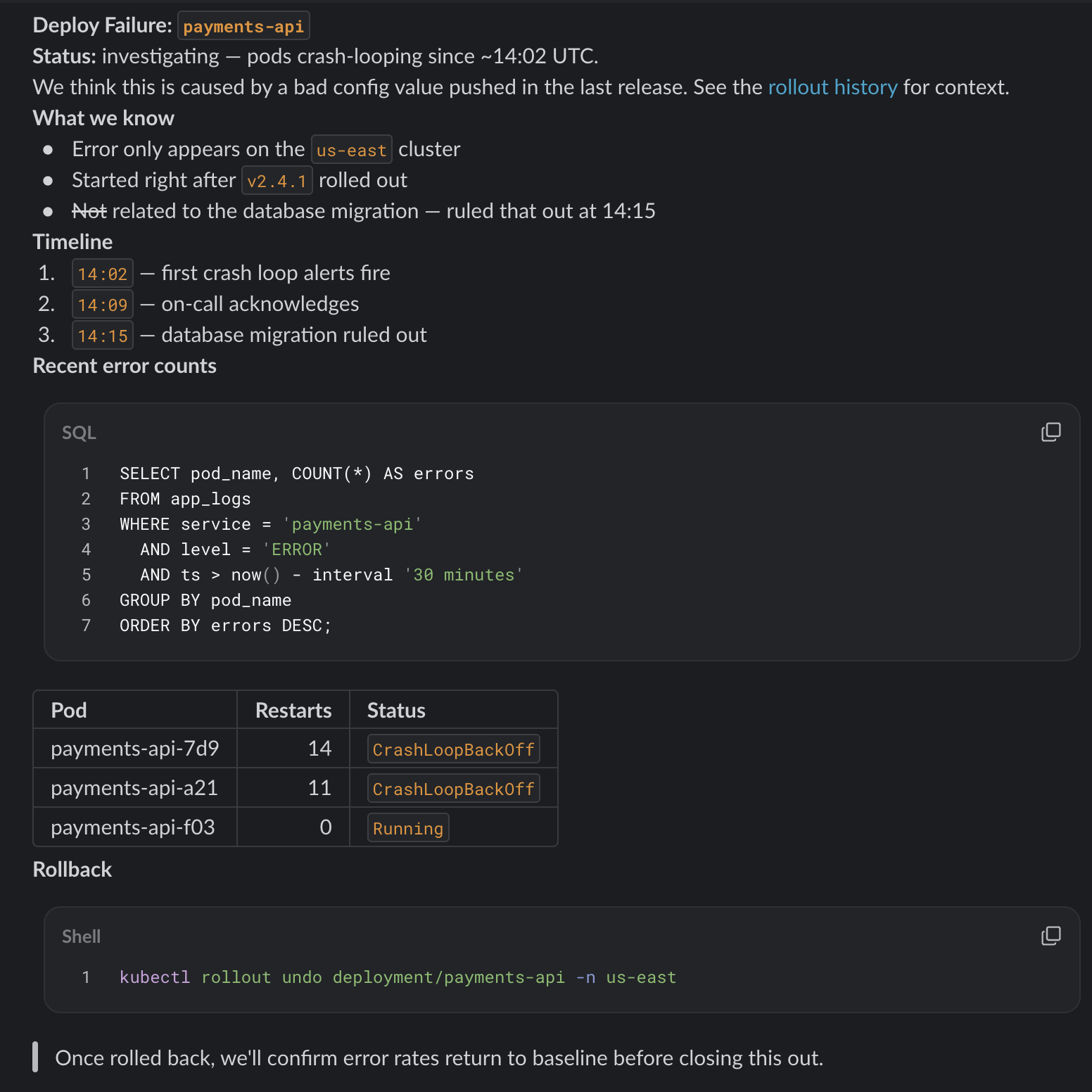
I was looking at a colleague's message - which was posted to Slack via Claude - and it had the regular sort of rendered-Markdown that you'd expect from Slack, but inline in the message it had a pretty-rendered table, and a syntax-highlighted code snippet, followed by other bits of text.
(Aside: I'm not really a fan of people using AI to post to Slack, because it infers that a) the human may not be involved in the loop and b) does that mean all our private conversations are now being ingested by the AI provider?)
This wasn't a "normal" message that could be posted normally, especially as it included multiple types of content all rendered nicely.
After doing some digging, it looks like it was created using the Slack Block Kit, which is much more powerful than the interface you get through Slack's clients.
With a bit of help from Claude Sonnet 5 I managed to get it to reproduce the message via Block Kit and some API calls, which then led me to what I really wanted - to be able to post these sorts of rich messages myself.
This is a step further on my journey of writing Markdown externally and then getting it into Slack, which I've talked about before on Linux or on Mac.
I set Claude Sonnet 5 on creating a command-line tool that would allow posting a richer Markdown body into Slack, which I've published as md2slack.
For example, let's take the following Markdown
<!-- Co-authored-by: Claude Sonnet 5 -->

# Deploy Failure: `payments-api`

**Status:** investigating — pods crash-looping since ~14:02 UTC.

We think this is caused by a bad config value pushed in the last release. See
the [rollout history](https://example.com/rollouts) for context.

## What we know

- Error only appears on the `us-east` cluster
- Started right after `v2.4.1` rolled out
- ~~Not~~ related to the database migration — ruled that out at 14:15

## Timeline

1. `14:02` — first crash loop alerts fire
2. `14:09` — on-call acknowledges
3. `14:15` — database migration ruled out

## Recent error counts

```sql
select
    pod_name,
    COUNT(*) as errors
from
    app_logs
where
    service = 'payments-api'
    and level = 'ERROR'
    and ts > now() - interval '30 minutes'
group by
    pod_name
order by
    errors desc;
```

| Pod | Restarts | Status |
| --- | ---: | --- |
| payments-api-7d9 | 14 | `CrashLoopBackOff` |
| payments-api-a21 | 11 | `CrashLoopBackOff` |
| payments-api-f03 | 0 | `Running` |

## Rollback

```sh
kubectl rollout undo deployment/payments-api -n us-east
```

> Once rolled back, we'll confirm error rates return to baseline before
> closing this out.
This then renders as:
This is a much nicer view, and I'm looking forward to using it where I'm trying to share more in-depth examples that I've previously been using a snippet for (or dealing with Slack's not-that-good interface for).
Note that this does require you are able to create and install an App into your Slack Workspace, which isn't always as straightforward at a company.